Bristles Brush for Procreate 5 and Above: Elevating Digital Lettering and Home Decor
The transition from traditional ink to digital canvas is often hindered by one specific frustration: the lack of organic texture. For artists who specialize in modern calligraphy, hand-lettering, or graphic design, the sterile perfection of standard digital lines can feel uninspiring. This is where the Bristles Brush for Procreate 5 and Above changes the game. It is not merely a tool; it is a bridge between the tactile satisfaction of physical media and the limitless flexibility of digital art. Designed specifically for the iPad Pro ecosystem, this brush set replicates the unpredictable, charming imperfections of real bristle brushes, allowing creators to inject soul and personality into their work.
While many digital brushes aim for smoothness, this collection leans into texture. It is hand-drawn and engineered to respond dynamically to pressure, making it an ideal companion for anyone looking to create elegant letters, quote designs, or intricate graphics that feel authentically handmade. Whether you are a professional designer crafting a wedding invitation suite or a hobbyist looking to jazz up your workspace with personalized decor, understanding how to leverage this tool can significantly enhance your creative output.
Transforming Modern Calligraphy and Hand-Lettering
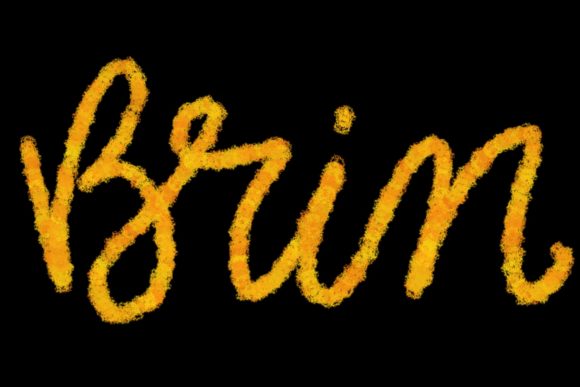
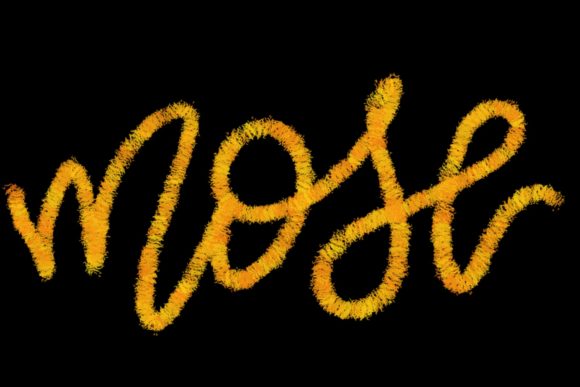
The primary strength of the Bristles Brush for Procreate 5 and Above lies in its application for lettering. Traditional calligraphy requires years of muscle memory to control the flow of ink and the splay of nibs. In the digital realm, achieving that same natural variation often feels forced. However, this brush set mimics the behavior of real bristles, capturing the subtle dry spots, ink pooling, and edge roughness that occur in physical painting.
For modern calligraphers, this means you can create sweeping, elegant scripts that retain a human touch. When designing greeting cards or social media quotes, the texture adds depth that flat vector fonts simply cannot match. Imagine creating a motivational quote for Instagram. Using a standard round brush might result in a clean, corporate look. Switching to the Bristles Brush introduces a gritty, artistic vibe that stops the scroll. It allows the lettering to feel like it was painted in the moment, connecting more emotionally with the viewer.
Moreover, the versatility of the brush supports various styles. From bold, thick downstrokes that mimic heavy marker pressure to delicate, whisper-thin upstrokes, the pressure sensitivity of the Apple Pencil interacts seamlessly with the brush engine. This dynamic range is crucial for designers who need to maintain consistency across large projects while keeping each character unique and lively.
Practical Applications in Branding and Stationery Design
Beyond personal art, the Bristles Brush for Procreate 5 and Above serves as a powerful asset for small business owners and freelance designers specializing in branding. Logos and brand identities are increasingly moving away from rigid geometric shapes toward organic, hand-crafted aesthetics. Consumers often perceive handwritten elements as more authentic, trustworthy, and approachable.
Consider a boutique coffee shop or a local bakery. A logo created with this brush set can convey warmth and artisanal quality. The texture implies that care and human effort went into the brand’s identity. Similarly, in the wedding industry, stationery designers can use these brushes to create custom monograms, envelope addressing, and menu headers. The ability to tweak, resize, and recolor digital lettering without losing resolution is a massive advantage over scanning physical ink work, yet the visual result remains indistinguishable from the real thing.
Designers can also layer these brush strokes with other digital elements. For instance, you might paint a textured background using the broader settings of the brush, then overlay crisp, modern typography. This contrast between the raw, organic bristle texture and clean sans-serif fonts creates a contemporary, high-end look that is popular in modern graphic design trends.
Jazzing Up Your Workspace and Home Decor
One of the most delightful aspects of mastering this tool is the ability to bring your digital creations into the physical world. The prompt mentions that the Bristles Brush for Procreate 5 and Above is perfect to jazz up your workspace and home, and this is entirely achievable through print-on-demand services or home printing.
Artists can create large-scale typographic posters featuring favorite quotes, family names, or abstract bristle patterns. Because the brush captures high-resolution detail, these designs look stunning when printed on canvas, metal, or high-quality paper. Imagine walking into your home office and seeing a large, framed piece of art featuring your own hand-lettered mantra, complete with the realistic texture of paint strokes. It adds a layer of personalization that mass-produced decor lacks.
This application extends to functional items as well. You can design custom mouse pads, desk mats, or even fabric prints for throw pillows. The organic nature of the bristle strokes translates beautifully to textiles, adding a cozy, artistic feel to living spaces. For those who enjoy scrapbooking or journaling, digital elements created with this brush can be printed onto sticker paper, allowing you to decorate physical planners with unique, hand-drawn accents that no store-bought sticker sheet can offer.
Technical Requirements and Compatibility Considerations
To fully appreciate the capabilities of the Bristles Brush for Procreate 5 and Above, it is essential to understand the hardware requirements. This brush set is optimized for the Procreate app on iPad Pro, specifically leveraging the advanced pressure sensitivity and tilt recognition of the Apple Pencil. It is not a universal tool; it will not function in Photoshop, Illustrator, or any desktop-based software. Furthermore, it is not suitable for iPads that do not support pressure-sensitive styluses.
Why does this matter? The magic of the bristle effect relies on the nuanced data sent from the Apple Pencil to the app. When you press harder, the bristles splay out; when you lighten your touch, they converge. Without a compatible pressure-sensitive stylus, the brush would behave like a static stamp, losing all its dynamic character. Therefore, before purchasing or downloading, ensure you have an iPad Pro and an Apple Pencil (1st or 2nd generation) to experience the intended performance.
Additionally, users should be aware that this is a specialized tool. It is not designed for photo editing, 3D modeling, or precise technical drawing. Its niche is organic, expressive mark-making. If your workflow involves switching frequently between vector-based design tools and raster-based painting, you will need to export your Procreate files appropriately to maintain quality. Understanding these limitations helps set realistic expectations and ensures you use the tool where it shines brightest.
Maximizing Value Through Creative Exploration
Getting the most out of the Bristles Brush for Procreate 5 and Above requires experimentation. Do not limit yourself to black ink on a white background. Try using the brush with vibrant, saturated colors to see how the texture interacts with hue. Experiment with blending modes in Procreate to layer bristle strokes over photos or gradients. You might find that the brush works exceptionally well for creating distressed textures on digital products, adding a vintage feel to modern designs.
For beginners, start by practicing basic strokes to understand how pressure affects the bristle spread. For experienced artists, challenge yourself to create complex compositions that mix fine details with broad, sweeping gestures. The key is to embrace the imperfections. The beauty of this brush lies in its unpredictability. Let the digital bristles dance across the screen, and allow the natural variations to guide your design choices.
In conclusion, the Bristles Brush for Procreate 5 and Above is more than just a digital asset; it is a catalyst for creativity. It empowers letterers, designers, and hobbyists to produce work that feels authentic, tactile, and deeply personal. Whether you are building a brand identity, designing wedding stationery, or creating art to adorn your home, this tool provides the organic touch necessary to stand out in a digital world. By respecting its technical requirements and exploring its diverse applications, you can unlock a new level of expressive potential in your digital artwork.