Flags, Stars, Brushes: A Comprehensive Design Resource for American Holidays
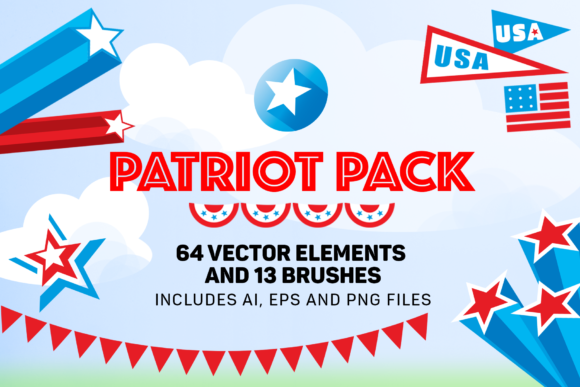
For graphic designers, digital artists, and craft enthusiasts, finding high-quality assets that balance aesthetic appeal with technical flexibility is a constant challenge. Flags, Stars, Brushes represents a curated collection of stylized graphical elements designed specifically for July 4th and other American national holidays. This resource goes beyond simple clipart, offering a versatile toolkit that includes bunting, banners, stars, and editable brushes. Understanding the scope and utility of this collection is essential for determining whether it aligns with your specific design workflow and project requirements.
Understanding the Collection’s Scope
The core value of Flags, Stars, Brushes lies in its diversity of formats and applications. The package is not merely a set of static images but a multi-format library intended to bridge the gap between digital design and physical production. It includes three editable EPS files and three editable AI files, which are critical for vector-based workflows. These formats allow users to scale graphics infinitely without loss of quality, a necessity for large-format printing such as banners or signage.
In addition to vector files, the collection provides 64 PNG files featuring stars, flags, and banners on transparent backgrounds. Transparency is a key feature here, as it allows designers to layer these elements over various backgrounds without cumbersome manual editing. Furthermore, the inclusion of 13 PNG files of brushes formatted as border patterns offers a unique utility for creating seamless edges and frames. The brushes are provided in both stroke and expanded forms, as well as individual PNGs, providing flexibility for different software capabilities and user skill levels.
Practical Applications and Use Cases
The versatility of this asset pack makes it suitable for a wide range of creative projects. One primary application is in holiday decorations and merchandising. Retailers and small business owners often need quick, professional-looking designs for seasonal promotions. The stylized nature of the flags and bunting allows for the creation of eye-catching social media graphics, email headers, and printable flyers. Because the files are editable, brands can easily adjust colors to match their specific corporate identity while maintaining the patriotic theme.
Another significant use case is in home decor and scrapbooking. The high-resolution PNGs are ideal for creating custom patterns for wallpaper, fabric prints, or scrapbook paper. Hobbyists who engage in paper crafts can utilize the border pattern brushes to create intricate frames for photographs or journal entries. The nautical themes present in some of the stylized flags also open up possibilities for coastal or maritime-inspired designs, extending the utility of the pack beyond just Independence Day celebrations.
Web designers may find the transparent PNGs particularly useful for creating thematic website elements. Whether it is a hero banner for a holiday sale or subtle background patterns for a blog post, the lightweight nature of PNG files ensures fast loading times while maintaining visual clarity. The ability to use these icons as modular components allows for rapid prototyping and deployment of holiday-themed web interfaces.
Evaluating Technical Benefits and Tradeoffs
When evaluating Flags, Stars, Brushes, it is important to consider the technical advantages alongside potential limitations. The primary benefit is the editability of the vector files. Having access to AI and EPS formats means that designers can modify anchor points, adjust curves, and change color palettes with precision. This level of control is indispensable for professional design work where brand consistency is paramount.
However, there are tradeoffs to consider. Vector editing requires a certain level of proficiency with software like Adobe Illustrator. Users who are only familiar with raster-based programs like Photoshop or free online editors may find the EPS and AI files less accessible. While the PNG files offer a more universal solution, they lack the scalability of vectors. If a user needs to print a design at a very large size, relying solely on PNGs could result in pixelation. Therefore, understanding your own technical comfort level and output requirements is crucial before purchasing.
Another consideration is the style of the graphics. The term "stylized" implies that these are not photorealistic representations of flags or stars. They are artistic interpretations, which may suit casual, festive, or modern design aesthetics but might not be appropriate for formal or historical contexts where accuracy is required. Designers working on serious governmental or educational materials should verify that the stylization aligns with the tone of their project.
Decision-Making Insights: Is This Pack Right for You?
To determine if Flags, Stars, Brushes is the right fit for your needs, consider the following factors:
- Project Volume: If you frequently create content for American holidays, having a dedicated library of assets can significantly reduce design time. The variety of elements allows for multiple unique compositions from a single purchase.
- Output Medium: If your work involves both digital and print media, the combination of PNGs and vector files is highly advantageous. For purely digital work, the PNGs may suffice, but for print, the vectors are essential.
- Customization Needs: If you need to tweak designs to fit specific layouts or brand guidelines, the editable AI and EPS files are non-negotiable. If you prefer drag-and-drop simplicity, the PNG brushes and individual icons will be more valuable.
It is also worth considering the alternative of creating these assets from scratch. While custom design offers total uniqueness, it is time-consuming and requires advanced illustration skills. Using a pre-made collection like this allows for a professional result with a fraction of the effort. However, if your brand requires a completely unique visual identity that cannot rely on common stock motifs, investing in custom illustration might be a better long-term strategy.
Integration into Existing Workflows
Integrating Flags, Stars, Brushes into your workflow is straightforward for most modern design environments. The PNG files can be dragged directly into almost any design software, including Canva, Photoshop, and Microsoft Word. The brush patterns, specifically, can save time when creating borders for invitations or certificates. By using the pre-made border patterns, designers avoid the repetitive task of manually aligning individual elements.
For vector users, importing the AI or EPS files into Illustrator allows for immediate manipulation. You can isolate specific stars or flag elements to create new compositions. The fact that the brushes are provided in expanded form as well as stroke form means that users who do not have brush-enabled software can still utilize the shapes as standard vector paths. This inclusivity ensures that the asset pack remains useful across different technical setups.
Final Considerations for Buyers
Ultimately, the value of Flags, Stars, Brushes depends on your specific design goals. It is a strong fit for freelancers, small business owners, and hobbyists who need reliable, high-quality patriotic imagery without the hassle of creating it from scratch. The mix of vector and raster formats provides a safety net for various use cases, ensuring that you have the right file type for the job at hand.
Before committing, review your upcoming project pipeline. If you have immediate needs for July 4th, Memorial Day, or Veterans Day materials, this collection offers a practical solution. However, if your design needs are highly specialized or require photorealism, you may need to supplement this pack with other resources. By carefully weighing the benefits of editability and variety against the learning curve of vector tools, you can make an informed decision that enhances your creative productivity.