Mastering Seamless Design with Procreate Pattern Brushes
The demand for high-quality, repeatable textures and motifs in digital illustration has grown significantly as creators expand their workflows from social media graphics to print-on-demand products. For artists working within the Apple ecosystem, Procreate Seamless Pattern Brushes offer a specialized solution to a common design challenge: creating infinite, tileable backgrounds and surfaces without the tedious manual alignment often required in traditional graphic design software. These tools are not merely decorative stamps; they are engineered assets designed to streamline the production of complex visual fields.
However, before integrating these brushes into your workflow, it is critical to understand their technical constraints. IMPORTANT: For use with the iPad Pro, these brushes are for the iOS app Procreate 4 and higher. Such pins DO NOT work in PHOTOSHOP or any other program. This exclusivity means that while the workflow is incredibly efficient for iPad users, it requires a commitment to the Procreate environment. Understanding this limitation is the first step in determining whether this asset pack aligns with your current creative infrastructure.
Understanding the Mechanics of Seamless Brushsets
Traditional pattern creation often involves designing a single tile, exporting it, and testing it in external software to ensure the edges align perfectly. This iterative process can be time-consuming and disrupts the creative flow. Procreate Seamless Pattern Brushes bypass this friction by pre-configuring the brush engine to handle repetition automatically. When you stroke the canvas, the brush engine calculates the spacing and offset to ensure that the end of one instance connects flawlessly with the beginning of the next.
The core value proposition here is speed and consistency. By building seamless patterns directly on the canvas, artists can visualize the final result in real-time. This immediate feedback loop allows for rapid experimentation with density, scale, and composition. Whether you are designing wrapping paper, textile prints, or website backgrounds, the ability to "paint" a pattern rather than construct it layer by layer represents a significant shift in operational efficiency.
Key Characteristics and Customization Potential
One of the standout features of high-quality pattern brushes is their versatility. Once the brushes are mounted—a process that is typically straightforward within the Procreate interface—they function like any standard brush tool. However, their behavior is optimized for tiling. This means you are not locked into a static image. Instead, you have dynamic control over several key parameters:
- Scale: You can adjust the size of the pattern elements to suit different mediums, from small fabric prints to large wall murals.
- Color: Because these are vector-based or high-resolution raster stamps, they inherit the color settings of your active brush. This allows for instant recoloring to match brand guidelines or seasonal palettes.
- Opacity: Adjusting opacity enables the creation of subtle watermarks, layered textures, or ghosted background effects that add depth without overwhelming foreground elements.
This level of customization ensures that the brushes do not feel repetitive. By varying these settings, you can generate an infinite variety of outputs from a single brush set. This flexibility is crucial for professionals who need to deliver multiple variations of a design concept to clients without starting from scratch each time.
Real-World Applications and Professional Utility
The practical application of Procreate Seamless Pattern Brushes extends across various industries. For freelance illustrators and surface pattern designers, these tools reduce the technical barrier to entry for creating sellable assets. Print-on-demand entrepreneurs, in particular, benefit from the ability to quickly prototype designs for products like phone cases, leggings, and home decor items. The high-quality stamps are crafted with versatile final production in mind, meaning they maintain clarity and integrity even when scaled up for larger formats.
Educators and content creators also find value in these brushes. Creating consistent background textures for educational materials, presentation slides, or video thumbnails becomes a matter of seconds rather than hours. The reliability of the seamless edge ensures that the final output looks professional, avoiding the amateurish appearance of visible seams or misaligned tiles.
Moreover, marketers and small business owners can use these patterns to create cohesive brand identities. By applying a consistent pattern texture across social media posts, email headers, and packaging designs, businesses can enhance brand recognition. The ease of use allows non-designers to achieve polished results that previously required hiring a graphic designer or mastering complex software like Adobe Illustrator.
Evaluating Quality and Long-Term Value
When assessing the long-term value of any digital asset, consistency and reliability are paramount. High-quality pattern brushes must perform predictably across different canvas sizes and resolutions. Poorly constructed brushes may exhibit gaps, overlaps, or resolution loss when scaled. The Procreate Seamless Pattern Brushes discussed here are designed to mitigate these issues, offering robust performance that holds up under scrutiny.
The investment in such a brush set pays dividends over time through saved labor hours. While the initial learning curve involves understanding how to mount and configure the brushes, the payoff is immediate. Artists report that once they integrate these tools into their routine, they rarely return to manual tiling methods for standard projects. The ability to dream big and build even bigger designs without being bogged down by technical minutiae empowers creators to focus on aesthetics and composition rather than mechanics.
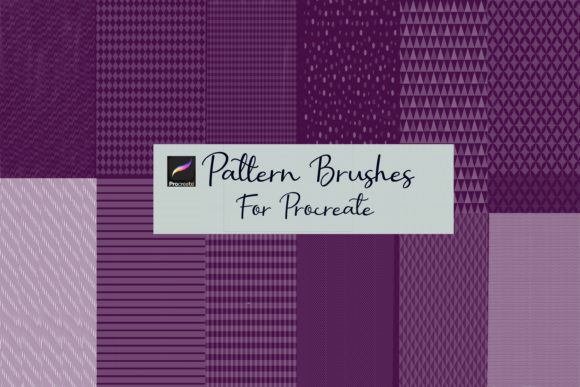
It is also worth noting the presentation and organization of these assets. Well-packaged brush sets often include preview images and usage guides, which further enhance usability. This attention to detail reflects the professionalism of the creator and provides users with the confidence to experiment freely.
Limitations and Compatibility Considerations
Despite their advantages, it is essential to acknowledge the limitations. As stated earlier, these brushes are for the iOS app Procreate 4 and higher. They are incompatible with Photoshop, Clip Studio Paint, Affinity Designer, or any desktop-based software. This siloed ecosystem can be a drawback for artists who rely on a hybrid workflow involving both iPad and desktop applications. If your final production pipeline requires vector files or specific CMYK color profiles managed in desktop software, you may need to export your Procreate designs and perform additional adjustments elsewhere.
Additionally, while the brushes are seamless, achieving a truly organic look sometimes requires manual intervention. Relying solely on the brush stroke can result in a mechanical, uniform appearance. Skilled users often combine pattern brushes with hand-drawn elements, masking techniques, and layer blending modes to break up repetition and add visual interest. Therefore, these tools should be viewed as part of a broader toolkit rather than a complete replacement for artistic judgment.
Who Should Invest in Procreate Seamless Pattern Brushes?
This toolset is ideally suited for:
- iPad-Centric Illustrators: Artists who primarily work on iPad Pro and value a streamlined, touch-first workflow.
- Surface Pattern Designers: Professionals looking to speed up the prototyping phase of textile and wallpaper design.
- Social Media Managers: Creators who need quick, attractive backgrounds for content creation without extensive design training.
- Educators and Bloggers: Individuals who require consistent visual elements for teaching materials or web content.
If your workflow already relies heavily on Adobe Photoshop or vector-based tools on a desktop, the utility of these brushes may be limited unless you are willing to adapt your process to include Procreate as a primary design stage. However, for those fully embedded in the Apple ecosystem, the integration is seamless and highly effective.
Final Thoughts on Workflow Integration
In conclusion, Procreate Seamless Pattern Brushes represent a powerful addition to the digital artist’s arsenal. They bridge the gap between conceptual sketching and final production, allowing for rapid iteration and high-quality output. By leveraging the unique capabilities of the Procreate brush engine, these tools enable users to build complex, seamless designs with minimal effort.
The key to maximizing their potential lies in understanding their specific environment—iPad Pro and Procreate 4+—and embracing the customization options available. With careful attention to scale, color, and opacity, these brushes can elevate your work, providing the professional polish needed in today’s competitive creative landscape. For those willing to adapt their workflow to this specialized tool, the result is a more efficient, flexible, and inspiring design process.