Procreate Sequin Brushes for iPad: A Guide
Drawing fashion illustrations is an art form that balances precision with flair. For decades, illustrators have spent countless hours manually rendering textures, particularly the complex, light-reflecting surface of sequined fabrics. It is a tedious process. You paint a base, add highlights, create shadows, and repeat this cycle hundreds of times to achieve a realistic shimmer. This is where Procreate Sequin Brushes for iPad change the workflow entirely. These tools are not just shortcuts; they are specialized assets designed to replicate the physics of light on textured surfaces, allowing creators to focus on design rather than repetitive detailing.
For professional fashion illustrators, textile designers, and digital artists, time is a finite resource. The ability to render high-quality textures quickly can significantly impact productivity and client turnaround times. By integrating these specific brushes into your digital toolkit, you streamline the creation of glamorous garments, accessories, and editorial pieces. The result is a polished, professional finish that maintains artistic integrity while drastically reducing manual labor.
Why Texture Matters in Digital Fashion Illustration
In the world of fashion design communication, texture tells half the story. A sketch of a evening gown looks flat without the indication of how the fabric interacts with light. Sequins, in particular, present a unique challenge because they are individual reflective units. When drawn manually, each sequin requires careful placement to suggest volume and movement. If done incorrectly, the fabric can look like a static pattern rather than a dynamic material.
Using Procreate Sequin Brushes for iPad solves this by providing pre-configured stamps and scattering algorithms that mimic natural distribution. This ensures that the sequins appear organic rather than mechanically repeated. For entrepreneurs launching clothing lines or marketers creating promotional content, this level of realism enhances the perceived value of the product. It bridges the gap between a conceptual sketch and a photorealistic representation, helping stakeholders visualize the final product more accurately.
Breakdown of the Brush Suite
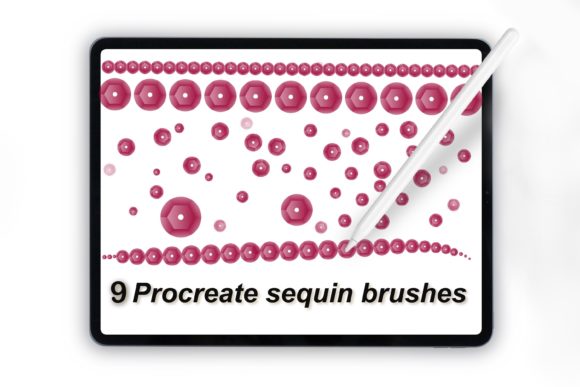
This collection is curated to cover various stages of the illustration process, from initial sketching to final rendering. Understanding what you get allows you to leverage each tool effectively. The suite includes nine distinct brushes, each serving a specific purpose in the creation of sequined effects.
- Faded and Dark Sequin Brush: Ideal for creating depth and shadow within the fabric. It helps establish the underlying structure before adding bright highlights.
- Scattered Sequins Brush: Perfect for loose, organic distributions where sequins are not tightly packed. This adds a natural, handcrafted feel to the design.
- Glow Sequins Brush: Adds a luminous quality, simulating strong light sources hitting the fabric. This is essential for evening wear and stage costumes.
- Two Sequin Designing Brushes: These versatile tools allow for custom patterning, giving you control over density and arrangement for specific design requirements.
- Sequin Monoline Brush: Useful for outlining shapes or creating linear sequin patterns, such as those found on trimmings or borders.
- Sequin Stamp: A single-element tool for precise placement, allowing you to drop individual sequins exactly where needed for corrections or accents.
- Sequin Lettering Brush: A specialized tool for typography, enabling the creation of glittering text for logos, posters, or decorative elements.
Each brush is optimized for pressure sensitivity and tilt support within Procreate, ensuring that your stroke dynamics translate naturally into the texture. This compatibility is crucial for maintaining the fluidity of your drawing experience on the iPad.
Practical Applications Across Industries
The utility of these brushes extends beyond traditional fashion illustration. Here is how different professionals can integrate them into their workflows.
Fashion Design and Technical Drawing
For fashion designers, speed is critical during the concept phase. Using Procreate Sequin Brushes for iPad allows you to iterate through multiple design variations quickly. You can test different colorways and densities without committing hours to manual rendering. This efficiency supports better decision-making and faster client presentations.
Digital Marketing and Social Media Content
Marketers and social media managers often need eye-catching visuals to engage audiences. Glitter and sparkle attract attention in crowded feeds. By using the glow and scattered sequin brushes, you can create vibrant graphics for product launches, holiday campaigns, or brand announcements. The sequin lettering brush is particularly effective for creating standout headlines or promotional quotes that pop against solid backgrounds.
Educational and Tutorial Creation
Educators teaching digital art or fashion design can use these brushes to demonstrate texture techniques. Instead of spending a lesson on the mechanics of drawing individual circles, instructors can focus on composition, color theory, and lighting. This shifts the educational focus from tedious execution to creative strategy, providing greater value to students.
Freelance Illustration and Commission Work
Freelancers often work under tight deadlines. Offering sequined designs as part of your portfolio can attract higher-paying clients looking for luxury aesthetics. With these tools, you can accept commissions for party invitations, album covers, or character designs featuring elaborate costumes without worrying about the time cost of manual detailing.
Maximizing Efficiency and Quality
To get the most out of these brushes, consider layering techniques. Start with the faded and dark sequin brush to map out the shadows and folds of the garment. This establishes the three-dimensional form. Next, use the scattered sequins brush to build up the mid-tones. Finally, apply the glow sequins brush sparingly on the highest points where light would hit directly. This layered approach creates a realistic depth that flat stamping cannot achieve.
Additionally, experiment with blend modes. Setting a sequin layer to "Overlay" or "Screen" can integrate the texture more naturally with the base color of the fabric. Adjusting the opacity allows for subtle effects, preventing the sequins from looking too heavy or artificial. Remember, the goal is enhancement, not domination. The texture should support the design, not distract from it.
Selecting the Right Tools for Your Workflow
When evaluating digital assets like Procreate Sequin Brushes for iPad, consider compatibility and ease of use. These brushes are designed specifically for the Procreate ecosystem, ensuring seamless integration with existing workflows. There is no need for complex installations or external plugins. Once imported, they appear in your brush library, ready for immediate use.
For beginners, the learning curve is minimal. The brushes are intuitive, responding naturally to Apple Pencil pressure. For advanced users, the customization options within Procreate allow you to tweak size, spacing, and jitter to create unique variations. This flexibility ensures that the tools grow with your skills, remaining relevant as your artistic style evolves.
In conclusion, incorporating specialized texture brushes into your digital arsenal is a smart investment for any creator working in fashion, design, or visual marketing. They reduce repetitive strain, save valuable time, and elevate the visual quality of your work. By leveraging Procreate Sequin Brushes for iPad, you free yourself to focus on creativity and innovation, delivering stunning results with greater efficiency.