Paint Brushes: A Practical Guide to Digital Assets in EPS, JPG, and PNG Formats
In the modern creative workflow, the distinction between physical tools and digital assets has become increasingly blurred. For graphic designers, illustrators, and content creators, Paint Brushes represent more than just a literal interpretation of an art supply; they are versatile visual elements that can elevate branding, enhance web design, and add organic texture to digital compositions. When evaluating resources for professional projects, understanding the utility of these assets—particularly when provided in multiple formats such as EPS, JPG, and PNG—is essential for maintaining efficiency and quality.
This analysis explores the practical applications of Paint Brushes digital assets, examining why the inclusion of vector and raster files matters, who benefits most from them, and how they integrate into real-world design scenarios. The goal is to provide an objective overview for professionals and serious hobbyists looking to expand their visual library with reliable, high-quality resources.
Understanding the Asset Package
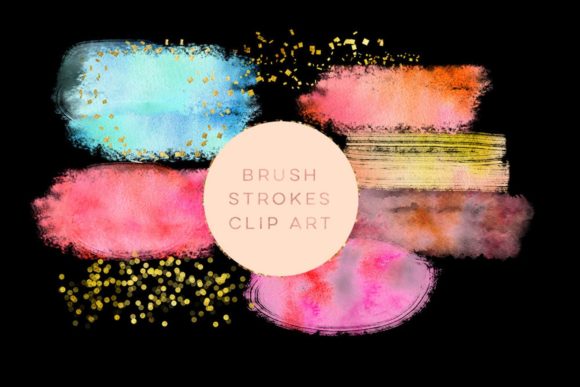
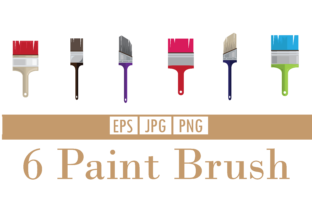
When you acquire a digital pack labeled as Paint Brushes, you are typically receiving a collection of stylized brush strokes, splatters, or textured marks. These are not software plugins for Photoshop or Procreate but rather static or vector-based graphical elements. The value of such a package lies largely in its versatility, which is determined by the file formats included. A comprehensive download that offers EPS, JPG, and PNG files addresses a wide spectrum of technical requirements.
The EPS (Encapsulated PostScript) format is the cornerstone of professional scalability. As a vector file, it allows designers to resize brush strokes to any dimension without losing clarity or experiencing pixelation. This is critical for large-format printing, such as banners, vehicle wraps, or signage, where a raster image might appear blurry or jagged. Vector brushes also offer the flexibility to change colors instantly within illustration software like Adobe Illustrator, making them adaptable to various brand guidelines.
On the other hand, PNG (Portable Network Graphics) files are indispensable for digital design. The key feature here is transparency. A high-quality PNG of a paint brush stroke allows it to be layered over photographs, websites, or social media graphics without a white background box interfering with the composition. This makes PNGs the go-to choice for web designers, UI/UX professionals, and social media managers who need quick, clean integration.
JPG (Joint Photographic Experts Group) files, while lacking transparency, are universally compatible and lightweight. They are useful for quick previews, mood boards, or situations where file size is a constraint and transparency is not required. While less flexible than PNG or EPS, their inclusion ensures that the assets can be opened and viewed on virtually any device or software, providing a baseline level of accessibility.
Practical Applications in Professional Workflows
The utility of Paint Brushes extends across several industries. For marketers and entrepreneurs, these assets offer a way to humanize digital content. In an era dominated by sleek, minimalist, and often sterile corporate design, organic brush strokes introduce warmth, energy, and a handcrafted feel. This can be particularly effective in campaigns aiming to convey creativity, authenticity, or artisanal quality.
- Branding and Identity: Logo designers often use vector brush strokes to create dynamic, energetic marks that suggest movement or creativity. The EPS format ensures these logos remain crisp on business cards and billboards alike.
- Web and UI Design: Bloggers and web developers use PNG brush elements to break up text blocks, highlight call-to-action buttons, or add decorative headers. The transparency allows for seamless blending with background colors or images.
- Print Media: Publishers and educators utilize these assets in textbooks, magazines, and flyers to draw attention to specific sections or to add visual interest to educational materials.
- Social Media Content: Influencers and small business owners use these overlays to create unique story templates or post backgrounds that stand out in crowded feeds.
From a workflow perspective, having all three formats saves time. Instead of converting files or searching for alternative resources when a specific format is needed, designers have immediate access to the right tool for the job. This reliability reduces friction in the creative process, allowing professionals to focus on composition and messaging rather than technical troubleshooting.
Evaluating Quality and Usability
Not all digital brush assets are created equal. When assessing a Paint Brushes package, several factors determine its long-term value. First, consider the resolution and detail of the raster files. High-quality PNGs should have sharp edges and smooth gradients, avoiding the pixelated look that plagues lower-resolution downloads. Similarly, vector EPS files should have clean paths without unnecessary anchor points, which can complicate editing.
Flexibility is another critical metric. Can the colors be easily adjusted? Are the brushes isolated on separate layers or files, or are they clumped together in a single sheet? Individual files offer greater control, allowing designers to rotate, scale, and position each stroke precisely. A well-organized package will label files clearly, distinguishing between different brush styles or sizes.
Consistency in style is also important. A cohesive set of brushes ensures that when multiple elements are used in a single project, they look like they belong together. Mixed styles can work, but only if intentionally curated. For professionals building a brand identity, consistency helps reinforce visual recognition.
It is also worth noting potential limitations. Static brush images, unlike live brush engines in software, cannot be manipulated in terms of pressure sensitivity or flow after creation. They are fixed shapes. Therefore, they are best suited for compositional elements rather than detailed illustration work where variable line weight is crucial. Understanding this limitation helps users set realistic expectations and choose the right tool for the task.
Who Benefits Most from These Assets?
While anyone with an interest in design can find value in Paint Brushes, certain groups will find them particularly advantageous:
- Freelance Graphic Designers: Those who manage multiple clients with diverse aesthetic needs benefit from having a versatile library of assets. Quick access to high-quality brushes can speed up mockup creation and client presentations.
- Small Business Owners and Entrepreneurs: Individuals managing their own marketing materials often lack the time or skills to create custom textures from scratch. Pre-made brushes offer a professional look with minimal effort.
- Educators and Publishers: Creating engaging learning materials often requires visual cues to guide student attention. Brush arrows, circles, and highlights can make worksheets and presentations more interactive and visually appealing.
- Digital Marketers: In the fast-paced world of social media, speed is essential. Having ready-to-use PNG overlays allows for rapid content creation without sacrificing visual quality.
For these audiences, the combination of EPS, JPG, and PNG formats ensures that whether they are printing a flyer, updating a website, or posting an Instagram story, they have the appropriate file type at hand.
Making the Right Choice for Your Project
Integrating Paint Brushes into your workflow requires a strategic approach. Start by identifying the tone you wish to convey. Rough, textured brushes suggest ruggedness or tradition, while smooth, fluid strokes imply elegance or modernity. Match the asset style to your brand voice.
When using these assets, pay attention to layering and opacity. Simply placing a brush stroke on top of an image can look amateurish if not blended properly. Experiment with blending modes in your design software to integrate the texture naturally. For vector files, take advantage of the ability to edit paths, tweaking the shape to fit your composition perfectly.
Finally, consider the long-term value. A one-time purchase of a high-quality, multi-format brush pack can serve hundreds of projects over years. Compared to subscription-based stock photo services, owning these assets outright provides cost-effective reliability. However, ensure that the license terms allow for commercial use if you are creating work for clients or selling products.
In conclusion, Paint Brushes digital assets are a practical addition to any creative toolkit. By offering EPS, JPG, and PNG formats, they cater to both print and digital needs, providing flexibility, scalability, and ease of use. For professionals and creators seeking to add organic, human touches to their digital work, these resources offer a balanced blend of convenience and quality. Understanding their strengths and limitations allows you to leverage them effectively, enhancing your designs without compromising on professionalism or efficiency.