Transforming Portraits with 20 Watercolor Portrait Clipping Masks
In the fast-paced world of digital content creation, standing out often means blending the tactile warmth of traditional art with the precision of modern software. This is exactly where 20 Watercolor Portrait Clipping Masks come into play. For photographers, graphic designers, and social media managers, these tools offer a bridge between a standard headshot and a piece of artistic expression. Instead of spending hours painting digitally or scanning physical watercolor textures, creators can apply professional-grade artistic effects in seconds. The result is a polished, painterly look that feels organic rather than forced.
The appeal of this specific collection lies in its versatility and ease of use. Whether you are a freelancer looking to elevate your brand identity or a hobbyist wanting to create unique gifts, understanding how to leverage these masks can significantly streamline your workflow. The set includes high-resolution assets—specifically 20 PNG files and 5 JPEGs at 6000x4000px with 300 DPI resolution. This ensures that whether you are printing a large canvas for a client or optimizing an image for Instagram, the quality remains crisp and detailed. At 157 MB, the file size is substantial, reflecting the depth and complexity of the watercolor textures included.
Why Choose Watercolor Overlays for Modern Design?
Watercolor has long been associated with softness, emotion, and creativity. In a digital landscape dominated by sharp vectors and hyper-realistic photography, introducing watercolor elements adds a human touch. When you use watercolor portrait masks, you are not just adding a filter; you are integrating texture, color bleed, and organic imperfections that mimic real paint on paper. This aesthetic is particularly powerful for industries that value authenticity, such as wellness coaching, handmade goods, education, and personal blogging.
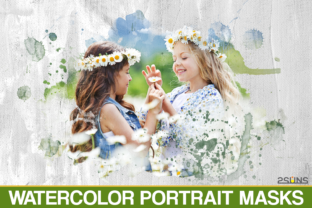
Unlike standard filters that apply a uniform effect across an entire image, clipping masks allow for precise control. You can dictate exactly where the watercolor texture appears, ensuring it complements the subject’s features rather than obscuring them. This level of control is crucial for professional results. For instance, a photographer might want the watercolor effect to frame the face while keeping the eyes sharp and clear. With these Photoshop brushes and PNG frames, achieving that balance becomes a matter of layer management rather than complex manual painting.
Real-World Applications for Creators and Businesses
The utility of 20 Watercolor Portrait Clipping Masks extends far beyond simple photo editing. Different users find value in these tools for varied reasons, depending on their specific goals and platforms.
Elevating Personal Branding and Social Media
For influencers and entrepreneurs, consistency is key. A cohesive visual style helps audiences recognize your content instantly. Using watercolor overlays can define a signature look. Imagine a life coach who uses soft, pastel watercolor frames for every testimonial graphic. This creates a calming, trustworthy vibe that aligns with their service. Similarly, lifestyle bloggers can use these watercolor textures to create engaging Pinterest pins or Instagram stories that stand out in a crowded feed. The high resolution ensures that even when cropped for vertical formats, the texture details remain visible and appealing.
Creating Unique Marketing Materials
Small business owners often need to produce marketing materials on a budget. Hiring a illustrator for every campaign is expensive, but using pre-made clipping masks offers a cost-effective alternative. Consider a boutique bakery launching a new seasonal menu. By applying a warm, earthy watercolor mask to photos of their pastries, they can evoke a sense of homemade craftsmanship. These images can then be used in email newsletters, Facebook ads, or printed flyers. The compatibility with software like Photoshop Elements and PicMonkey means that even those without advanced design skills can achieve professional-looking results.
Enhancing Educational and Editorial Content
Educators and publishers frequently look for ways to make dry content more engaging. Textbooks, online courses, and e-books benefit from visual breaks that capture attention. Inserting portraits of historical figures, authors, or experts with a watercolor effect can add a scholarly yet artistic flair. It softens the rigidity of standard headshots, making the content feel more approachable. For example, an online course about creative writing might use these masks for instructor bios, reinforcing the creative theme of the curriculum.
Personal Projects and Gift Giving
On a personal level, these tools are invaluable for creating meaningful gifts. Turning a family photo into a watercolor-style print is a popular trend for anniversaries, birthdays, and memorials. The emotional impact of a painted portrait often exceeds that of a standard photograph. With the provided PNG frames and high-resolution files, users can print these creations at home or through professional services without losing quality. The ability to work with layers allows for customization, such as adding handwritten notes or dates within the watercolor splashes.
Technical Considerations and Workflow Tips
To get the most out of 20 Watercolor Portrait Clipping Masks, it is essential to understand the technical requirements. The set is compatible with any software that supports layers, including Photoshop, Paint Shop Pro, and various photo editors. However, the experience varies depending on the tool you use.
If you are a Lightroom user, note that Lightroom does not natively support layers in the same way Photoshop does. You will need a plugin that allows layer functionality to utilize these masks effectively. Without such a plugin, you may find it difficult to apply the clipping masks correctly. For most users, Photoshop or Photoshop Elements remains the gold standard due to their robust layer masking capabilities. These programs allow you to easily adjust opacity, blend modes, and positioning, giving you full creative control.
When working with the 6000x4000px files, ensure your computer has sufficient memory and processing power. Large files can slow down older systems, so closing unnecessary applications before starting your project is a good practice. Additionally, always work on a copy of your original photo. This preserves the source image, allowing you to experiment with different masks from the set without fear of permanent changes.
Choosing the Right Mask for Your Image
Not every watercolor texture suits every portrait. The set includes 20 different PNGs, offering a variety of styles. Some may feature bold, vibrant splashes, while others offer subtle, washed-out edges. When selecting a mask, consider the mood of the original photo. A bright, cheerful portrait pairs well with vivid colors, whereas a somber or professional headshot might benefit from muted, neutral tones.
Pay attention to the composition of the mask. Does the texture frame the face naturally? Does it leave enough negative space for text if you plan to add quotes or titles? Testing a few different masks from the collection on the same image can reveal surprising results. Often, the mask that seems least obvious at first glance provides the most sophisticated finish.
Furthermore, consider the background of your portrait. Watercolor masks work best when there is a clear distinction between the subject and the background. If the background is cluttered, the watercolor effect may get lost. In such cases, removing the background or blurring it slightly before applying the mask can enhance the overall impact. This step ensures that the watercolor texture interacts primarily with the subject, creating a cohesive and focused image.
Final Thoughts on Integrating Watercolor Artistry
Incorporating 20 Watercolor Portrait Clipping Masks into your creative toolkit is more than just adding a visual effect; it is about enhancing storytelling. Whether you are building a brand, selling a product, or preserving a memory, the right visual treatment can evoke emotion and connection. By leveraging these high-resolution, easy-to-use assets, you can produce artwork that resonates with your audience on a deeper level. The key is to experiment, understand your software’s capabilities, and choose masks that align with your intended message. With practice, these tools will become an indispensable part of your design process, allowing you to create stunning, painterly portraits with efficiency and confidence.