Mastering Digital Art: A Guide to Watercolor Portrait Masks and Halloween Overlays
In the rapidly evolving world of digital design, the line between traditional artistry and modern technology continues to blur. For graphic designers, photographers, and creative hobbyists alike, the ability to blend organic textures with digital precision is a highly sought-after skill. One of the most effective tools for achieving this aesthetic is the use of watercolor portrait masks and specialized overlays. These digital assets allow creators to infuse their work with the soft, fluid beauty of hand-painted watercolors without requiring years of training in traditional media.
This article explores the utility, application, and significance of digital watercolor resources, specifically focusing on comprehensive sets that include Halloween-themed masks, clipping masks, and high-resolution brushes. Whether you are designing spooky seasonal graphics or elegant portrait enhancements, understanding how to leverage these tools can significantly elevate your creative output.
Understanding Digital Watercolor Assets
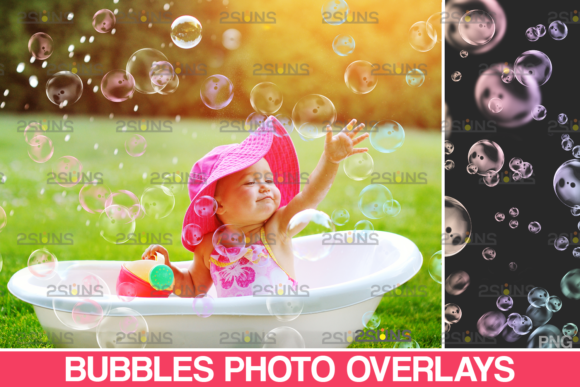
Before diving into specific applications, it is essential to understand what these digital assets actually are. A watercolor overlay is typically a high-resolution image file, often in PNG format, that features transparent backgrounds. This transparency allows the watercolor texture to sit seamlessly on top of another image, such as a photograph or a vector graphic, without obscuring the underlying details entirely.
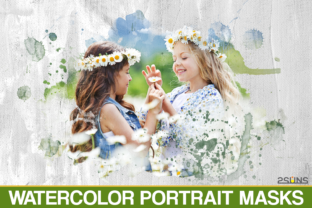
Clipping masks take this concept a step further. In software like Adobe Photoshop, a clipping mask uses the content of one layer to control the visibility of the layer above it. When applied to watercolor portraits, this technique allows the watercolor texture to appear only within the boundaries of a specific shape or subject, such as a human face or a silhouette. This creates a sophisticated, integrated look where the paint seems to belong to the subject rather than just sitting on top of it.
The Role of Resolution and File Formats
The quality of digital art is heavily dependent on the resolution of the assets used. Professional-grade packs, such as those containing 20 Watercolor Portrait Masks, usually offer files at 300 DPI (Dots Per Inch). This high resolution ensures that the images remain crisp and detailed even when printed on large formats or viewed on high-definition screens.
Common file formats in these packs include:
- PNG: Ideal for overlays due to support for transparency.
- JPEG: Useful for background textures or reference images, though they lack transparency.
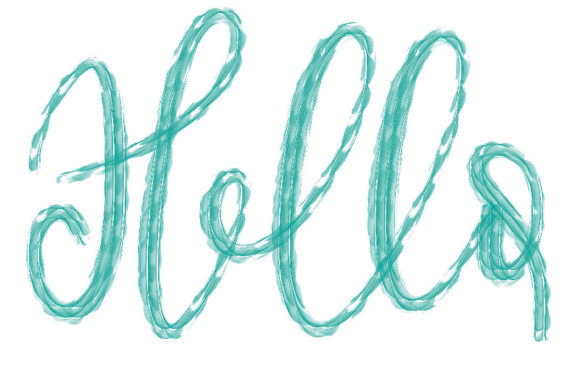
- .abr (Photoshop Brush): Allows users to paint custom watercolor strokes directly onto their canvas, offering maximum flexibility.
For instance, a typical comprehensive set might include 20 PNGs for quick drag-and-drop effects, 5 JPEGs for textured backgrounds, and 1 .abr file for custom brushwork. The total file size of such a pack can be substantial, often around 178 MB, reflecting the high quality and detail embedded in each asset.
Practical Applications in Creative Projects
The versatility of watercolor masks extends far beyond simple photo editing. These tools are invaluable in various sectors of the creative industry, from marketing and advertising to personal artistic expression.
Seasonal and Thematic Design
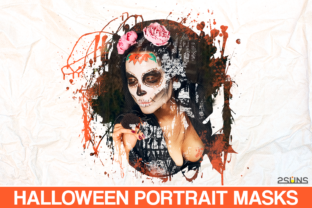
Halloween provides a perfect example of how thematic overlays can transform standard designs. A set of Halloween watercolor brushes or masks can introduce eerie yet artistic elements to party invitations, social media posts, or product packaging. Imagine a portrait where the subject’s features are partially obscured by swirling, dark watercolor mists or vibrant orange and purple splashes. This effect creates a mood that is both spooky and sophisticated, moving away from cliché cartoonish graphics toward a more refined aesthetic.
By using pre-made Halloween overlays, designers can save hours of manual painting time. Instead of creating complex texture effects from scratch, they can apply a mask, adjust the blending mode, and achieve a professional result in minutes. This efficiency is crucial for businesses operating under tight deadlines during peak seasonal periods.
Portrait Enhancement and Fine Art
Beyond seasonal themes, watercolor portrait masks are widely used in fine art and wedding photography. They add a dreamy, ethereal quality to images. A photographer might use a soft pink or blue watercolor overlay to enhance the romantic feel of an engagement photo. The key here is subtlety; the goal is to complement the subject, not overpower them.
These tools also empower individuals who may not possess advanced drawing skills to create unique wall art. By combining a high-quality photograph with a watercolor frame or mask, users can produce prints that look like expensive commissioned paintings. This democratization of art creation is one of the most significant impacts of digital overlays on modern creativity.
Software Compatibility and Workflow
One of the primary concerns for users adopting new digital assets is compatibility. Fortunately, most watercolor overlays and masks are designed to work with a wide range of software applications. However, the workflow varies depending on the program used.
Layer-Based Editing Software
Programs that support layers are ideal for working with these assets. This includes industry standards like Adobe Photoshop and Photoshop Elements, as well as alternatives like Paint Shop Pro and PicMonkey’s Photo Editor. In these environments, users can easily import PNG overlays, adjust their opacity, and change blending modes (such as "Multiply," "Screen," or "Overlay") to integrate the watercolor texture naturally with the base image.
The inclusion of an .abr brush file is particularly beneficial for Photoshop users. It allows for dynamic interaction with the artwork. Instead of being limited to pre-defined shapes, artists can paint their own watercolor effects, adjusting pressure and flow to mimic real-world brush behavior. This level of control is essential for creating bespoke designs that stand out from template-based work.
A Note for Lightroom Users
It is important to address a common misconception regarding Adobe Lightroom. Unlike Photoshop, Lightroom is primarily a non-destructive photo editor focused on color correction and organization, not layer-based compositing. Therefore, standard PNG overlays and clipping masks do not function natively within Lightroom.
Note to Lightroom users: Please ensure you have a specialized plugin that allows you to work with layers if you intend to use these overlays directly within the Lightroom interface. Alternatively, the recommended workflow is to perform basic edits in Lightroom and then export the image to Photoshop or another layer-capable program to apply the watercolor masks. This two-step process ensures the highest quality results and maintains the integrity of the original photograph.
Maximizing Value and Avoiding Common Pitfalls
To get the most out of a digital asset pack, users should approach their projects with a clear understanding of blending modes and color theory. A common mistake is applying an overlay at 100% opacity, which can look artificial and harsh. Reducing opacity to between 20% and 60% often yields a more realistic and pleasing effect.
Additionally, consider the color palette of your base image. If you are using a Halloween-themed set with deep purples and oranges, ensure that these colors complement the tones in your photograph. Clashing colors can distract the viewer and diminish the overall impact of the design.
Another pitfall is ignoring the resolution. Always check that your canvas size matches the resolution of your assets. Using a small, low-resolution overlay on a large print project will result in pixelation and loss of detail. Since high-quality packs often provide 300 DPI files, starting with a large canvas ensures that you can scale down if necessary without losing quality, but you cannot scale up effectively.
Conclusion
Digital watercolor portrait masks and overlays represent a powerful intersection of tradition and technology. They offer an accessible way for creators of all skill levels to incorporate the elegance of watercolor art into their digital projects. Whether you are designing for Halloween, enhancing portraits, or exploring new artistic avenues, these tools provide flexibility, efficiency, and professional quality.
By understanding the technical requirements—such as file formats, resolution, and software compatibility—and applying best practices in blending and composition, you can unlock the full potential of these assets. As digital design continues to evolve, mastering these techniques will remain a valuable skill for anyone looking to create visually compelling and emotionally resonant imagery.